
Quick answer
Each employee's leave plan has a Benefits tab in Tilt that shows every applicable benefit — including its status (Pending, Approved, Denied), duration, time taken vs. planned, and any documents required to approve the benefit.
Who this applies to / Prerequisites
- You are an HR user at a Tilt customer.
- The employee has an active leave plan in Tilt.
Steps
Check an employee's benefit statuses:
- Log into Tilt as an HR user.
- Click Leaves in the left-hand navigation.
- On the Active Leave Plans page, use the search filters to locate the leave you want to review.
- Click on the leave and navigate to the Benefits tab in the right-hand fly-out.
- Each benefit shows its status directly above the benefit title.
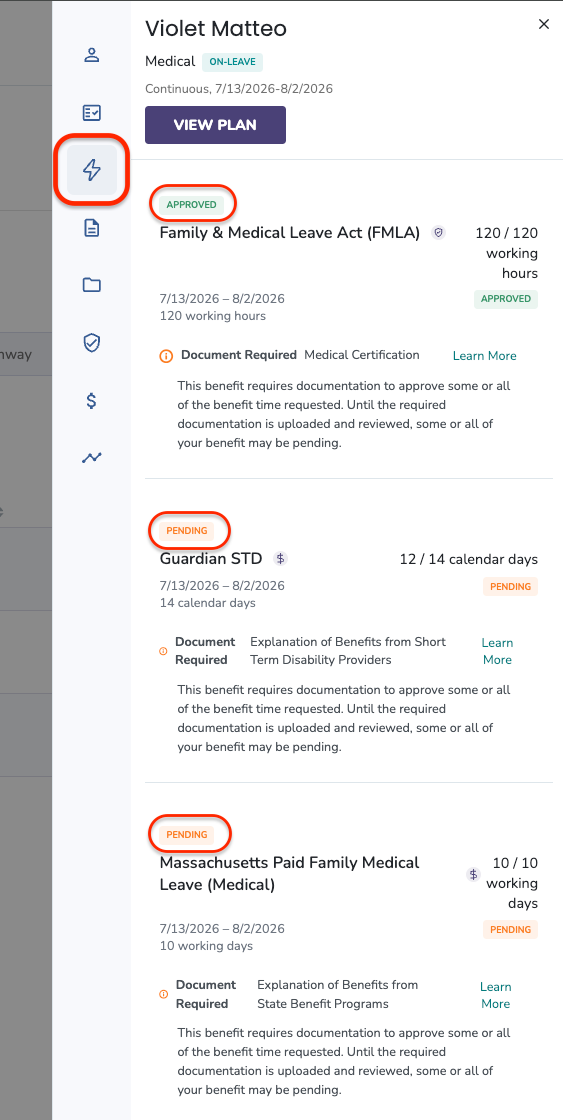
Understand what's on the Benefits tab:
The Benefits tab shows:
- All applicable benefits for the leave
- Each benefit's status (Pending, Approved, Denied)
- Each benefit's duration for the leave
- How each benefit is measured (working hours, working days, or calendar days)
- How much of the benefit the employee has used within the leave dates
- How much time is remaining for each benefit within the leave dates
- Documents required for benefit approval, if applicable
What if it doesn't work
- If you don't see the Benefits tab, confirm you have HR access. Regular users and Payroll users don't see this tab.
- If a benefit is stuck in Pending, check whether the employee still owes documentation. See the Required Documents for Benefit Approval section below.
- If the balances look wrong, contact your Leave Specialist for a review.
Limits and exceptions
Benefit statuses:
- Pending — the benefit is waiting on the necessary information before it can be approved (typically, documentation from the employee).
- Approved — all supporting information has been received and reviewed, and the benefit is confirmed.
- Denied — the benefit request has been denied. This happens when:
- The Leave Specialist marks a benefit as denied
- The benefit is offered by the company, but doesn't apply to the specific employee's situation
- Some benefits within a leave plan do not require review and approval. Those don't show a status label.
Required Documents for Benefit Approval:
|
Benefit |
Required Documentation |
|
FMLA |
Medical certification |
|
ADA |
Medical certification |
|
CFRA |
Medical certification |
|
PWFA |
Medical certification |
|
Company Paid Medical Leave |
Medical certification |
|
Company Paid Parental Leave |
Medical certification + Proof of bonding document |
- If a document is required to approve a benefit, the employee will see it in their To Do Items and in the Documents section of their leave plan.
- To view, upload, or manage the documents the employee has submitted, see How do I view documents for a specific employee on leave?
Related questions
- View and Manage Employee Leave Documentation (collection)
- How do I view documents for a specific employee on leave?
- How do I view an employee's FMLA balance and history in Tilt?
- HR Dashboard