
Quick answer
The Active Leave Plans page in your HR dashboard shows document status for every active leave at your company. The Documents column shows how many are submitted out of how many are required — red text means the remaining documents are within 30 days of their due date or already overdue.
Who this applies to / Prerequisites
- You are an HR user at a Tilt customer.
- Employees at your company have active leave plans in Tilt.
Steps
- Log into Tilt as an HR user.
- Click Leaves in the left-hand navigation.
- On the Active Leave Plans page, review the Documents column for each leave. You'll see counts like "3 /5" meaning 3 documents have been submitted out of 5 required.
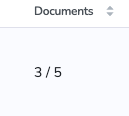
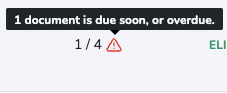
- Red text signals that remaining documents are within 30 days of their due date or already overdue.
- Hover over the ⚠️ icon on any row to see additional detail about the warning.
- Check the Outstanding Items section of your HR Dashboard for overdue documents and documents submitted in the last 24 hours, with direct links to each leave plan.
What if it doesn't work
- If you don't see the Leaves tab, confirm you have HR access. Regular users and Payroll users don't see the Active Leave Plans page.
- If the Documents column shows "0 of 0" for a leave, the Leave Specialist may not have set up document requirements for that leave yet. Contact your Leave Specialist if this is unexpected.
Limits and exceptions
- This view shows document counts and status warnings, but not the actual documents. To view individual documents, open the specific employee's leave plan. See How do I view documents for a specific employee on leave?
- Only HR users see the Active Leave Plans page. Managers and other users don't have this view.
- The Documents column reflects counts at the time of page load. Refresh the page to see the latest counts.
Related questions
- How do I view documents for a specific employee on leave?
- How do I upload a document on behalf of an employee on leave?
- How do I download a document template to share with an employee on leave?