
Quick answer
You can close a pay period from the Company Payroll page in Tilt. Closing tells Tilt how much an employee was paid, which is used for pay calculations. If you don't close a pay period manually, Tilt will close it automatically at 11:59:59 PM PST on the last day of the pay period.
Who this applies to / Prerequisites
- You are an HR or Payroll user at a Tilt customer.
- Your company's pay period schedules are already added to Tilt. See How do I add a new pay period schedule in Tilt?
- You need to close a specific pay period, or verify that it's closed.
Steps
- Log into Tilt as an HR or Payroll user.
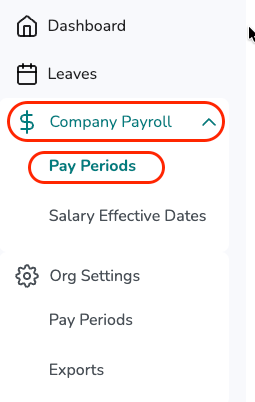
- Click Company Payroll -> Pay Periods in the left-hand navigation.
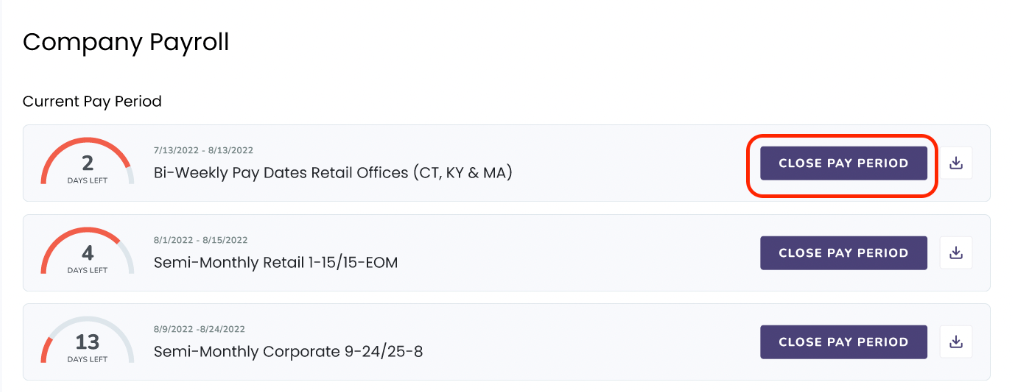
- Under the Pay Periods tab, find the pay period you want to close. Each card shows the pay period schedule title, its start and end dates, and how many days are left..
- Click Close Pay Period on the pay period card.
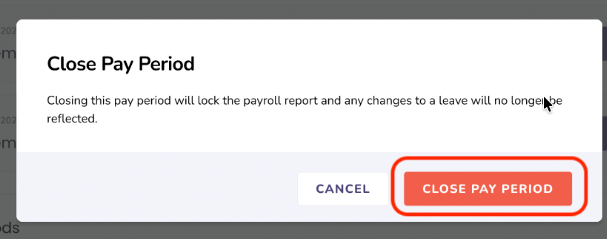
- A confirmation pop-up will appear. Click Close Pay Period a second time to confirm.
- Verify the pay period is closed: a red Closed tag appears in the top left of the pay period card, along with the closed-by details.
What if it doesn't work
- If you don't see the Close Pay Period button, confirm you have HR or Payroll access.
- If a pay period doesn't appear on your Company Payroll page, confirm the schedule has been added and includes the date range you're looking for.
- If you're integrated with Rippling, you don't need to manually close pay periods. Tilt closes them automatically based on the Rippling integration.
Limits and exceptions
- Once a pay period is closed, it is locked. This action cannot be undone.
- Pay periods close automatically at 11:59:59 PM PST on the last day of the pay period if no one closes them manually first.
- If you need to download the payroll report for a closed pay period, click the Download icon on the closed pay period card. See How do I download a payroll report from Tilt?
Related questions
- How do I add a new pay period schedule in Tilt?
- How do I download a payroll report from Tilt?
- Navigating Tilt's Company Payroll Page
- Payroll Report Overview