
Quick answer
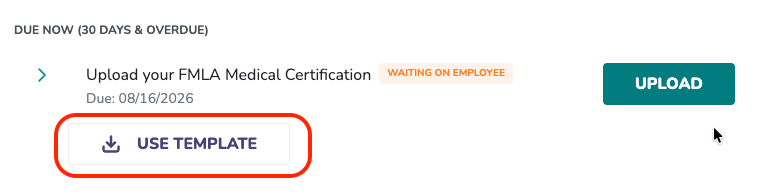
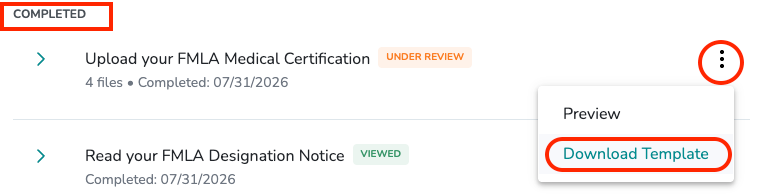
You can download a blank template for any document requirement that has one from the employee's leave plan Documents section. Click USE TEMPLATE on a document that still needs action, or the three-dot menu on a completed document and select Download Template.
Who this applies to / Prerequisites
- You are an HR user at a Tilt customer.
- The employee has an active leave plan in Tilt.
- The document requirement you want a template for has a template available in Tilt.
Steps
- Log into Tilt as an HR user.
- Click Leaves in the left-hand navigation.
- Click the row for the employee, then click View Documents in the fly-out to open their full leave plan.
- On the Documents page, find the document with the template you want.
- Choose your path:
- If the document still needs action (Due Now or Due Later): click USE TEMPLATE below the document name. A blank template downloads to your device.
- If the document is already completed: click the three-dot icon on the document card, then click Download Template. A blank template downloads.
- Share the template with the employee via email or another channel outside of Tilt.
What if it doesn't work
- If you don't see USE TEMPLATE or Download Template, that document doesn't have a template available. Contact your Leave Specialist if you believe one should exist.
- If the template file won't open on your device, confirm you have software installed that can open the file type (PDF).
- If the document uses the FILL OUT flow, there's no template — the employee completes the form directly in Tilt.
Limits and exceptions
- Not every document has a downloadable template. Templates are only provided for documents where Tilt has a standard blank form.
- Downloading a template does not mark the document requirement as complete. The employee (or you, on their behalf) still needs to upload the completed version.
- Templates you download are blank — they don't include employee-specific pre-filled information.
- Documents that use the in-Tilt fill-out flow (like the Benefit Promissory Note) do not have templates.
Related questions
- How do I upload a document on behalf of an employee on leave?
- How do I view documents for a specific employee on leave?
- How do I check document status across my company's active leave plans?