
Quick answer
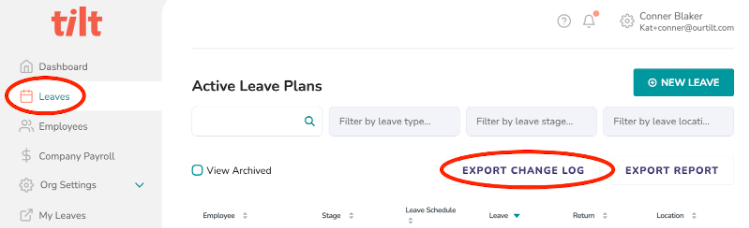
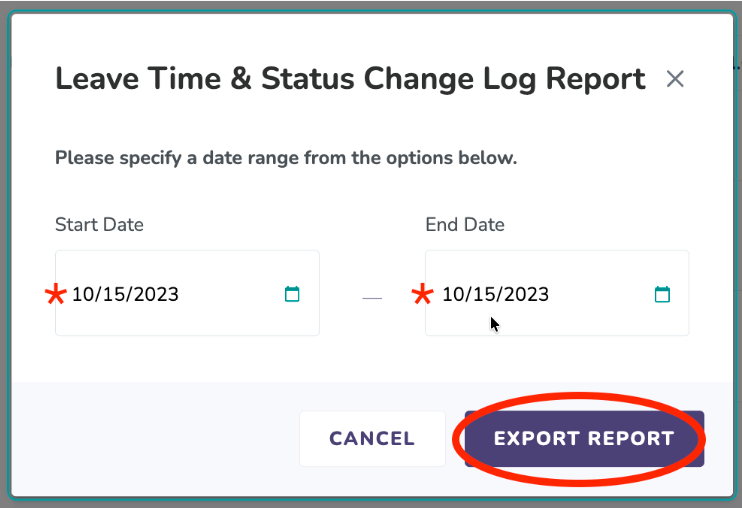
The Leave Time Status Change Log is a report of every change made to blocks of leave time. HR users can download it from the Leaves page in the HR Dashboard by clicking Export Change Log, entering a date range, and clicking Export Report.
Who this applies to / Prerequisites
- You are an HR user at a Tilt customer.
- You want to review changes to leave time (pending, approved, or denied) across your employees' leave plans.
- Your company has the Leave Time Status Change Log feature enabled. This is a controlled feature and isn't available to all companies by default.
Steps
- Log into Tilt as an HR user.
- Click Leaves in the left-hand navigation to open your HR Dashboard's Leaves page.
- Click the Export Change Log button.
- In the pop-up modal, enter the Start Date and End Date spanning the period you want to review.
- Click Export Report. The report downloads to your device as a CSV file.
What if it doesn't work
- If you don't see the Leaves tab or the Export Change Log button, confirm you have HR access. Regular users and Payroll users don't see these options. If you have the correct permissions and still don’t see this, your company may not have this feature enabled. Reach out to your Customer Success Manager to ask about getting it turned on.
- If the report doesn't download after clicking Export Report, check your browser's download and pop-up settings.
- If the report is empty for the date range you selected, no leave time changes occurred within that window.
Limits and exceptions
- The system pulls data based on Pacific Standard Time (PST). Adjust your date range accordingly if you're in a different time zone.
- The Change Log covers all changes to leave time blocks (pending, approved, denied, and deleted). This is more comprehensive than the Leave Data Export, which only shows currently active or under-review blocks.
- Only HR users can download the Change Log.
- The Leave Time Status Change Log is a controlled feature that must be enabled per company. Not every Tilt customer has access by default. If your company needs it, contact your Customer Success Manager.
Related questions
- What information is on the Leave Time Status Change Log and how do I read it?
- How do I download leave data from Tilt as an HR user?
- How do employee leave changes (extending, adding, canceling) appear on the Leave Export?