
Quick answer
You can enable Google SSO enforcement through your company settings in Tilt under the Security tab. Users will sign in with Google going forward — as long as their work email in Tilt matches their Google Workspace email.
Who this applies to / Prerequisites
- You are an HR admin at a Tilt customer.
- Your company uses Google Workspace.
- Employees retain access to Google Workspace during leave.
- Your employees' work emails in Tilt match their Google Workspace emails.
Steps
- Log into Tilt as an HR admin.
- Click Org Settings in the left-hand navigation.
- Click Security.
- Verify that your employees' work emails in Tilt match their Google Workspace emails. As long as these match, no duplicate accounts will be created.
- Toggle on Google Sign-In.
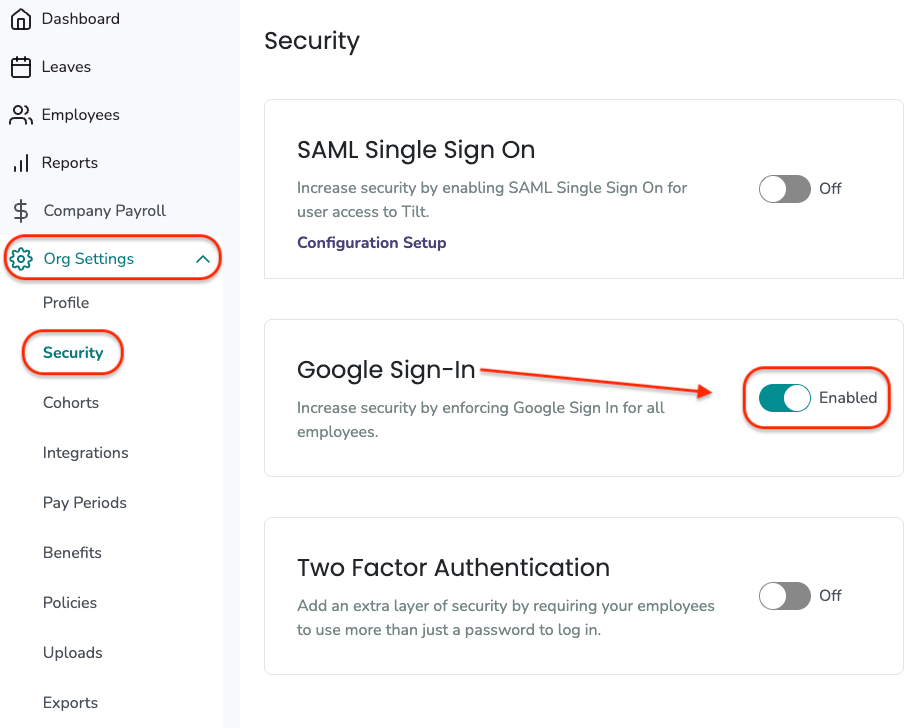
- Communicate the change to your employees so they know to use Sign in with Google going forward.
What if it doesn't work
- If an employee can't log in after enforcement, confirm their work email in Tilt matches their Google Workspace email exactly.
- If email addresses don't match, update the work email in Tilt (or in your HR system, if you sync data to Tilt).
Limits and exceptions
- If your company revokes Google Workspace access during leave, employees will LOSE access to Tilt during leave. Consider 2FA, or leave Google SSO OPTIONAL instead.
- Do NOT enforce 2FA in Tilt if you're enforcing Google SSO. Google handles two-factor authentication at the SSO layer. See Can I enforce both Google SSO and 2FA at the same time on Tilt?
- If you leave Google SSO optional (not enforced), employees can still use Sign in with Google as one option, and email + password as the other.
Related questions
- Which login method should I choose for my company's Tilt account?
- Can I enforce both Google SSO and 2FA at the same time on Tilt?
- How do I switch from one enforced login method to another in Tilt?