
Overview
Sometimes an employee needs a little help activating their Tilt account. As a Tilt HR admin, you can resend the welcome email to any employee who has been added to Tilt and has a pending account activation status.
For help with login issues after activation, see [Troubleshoot Your User Login]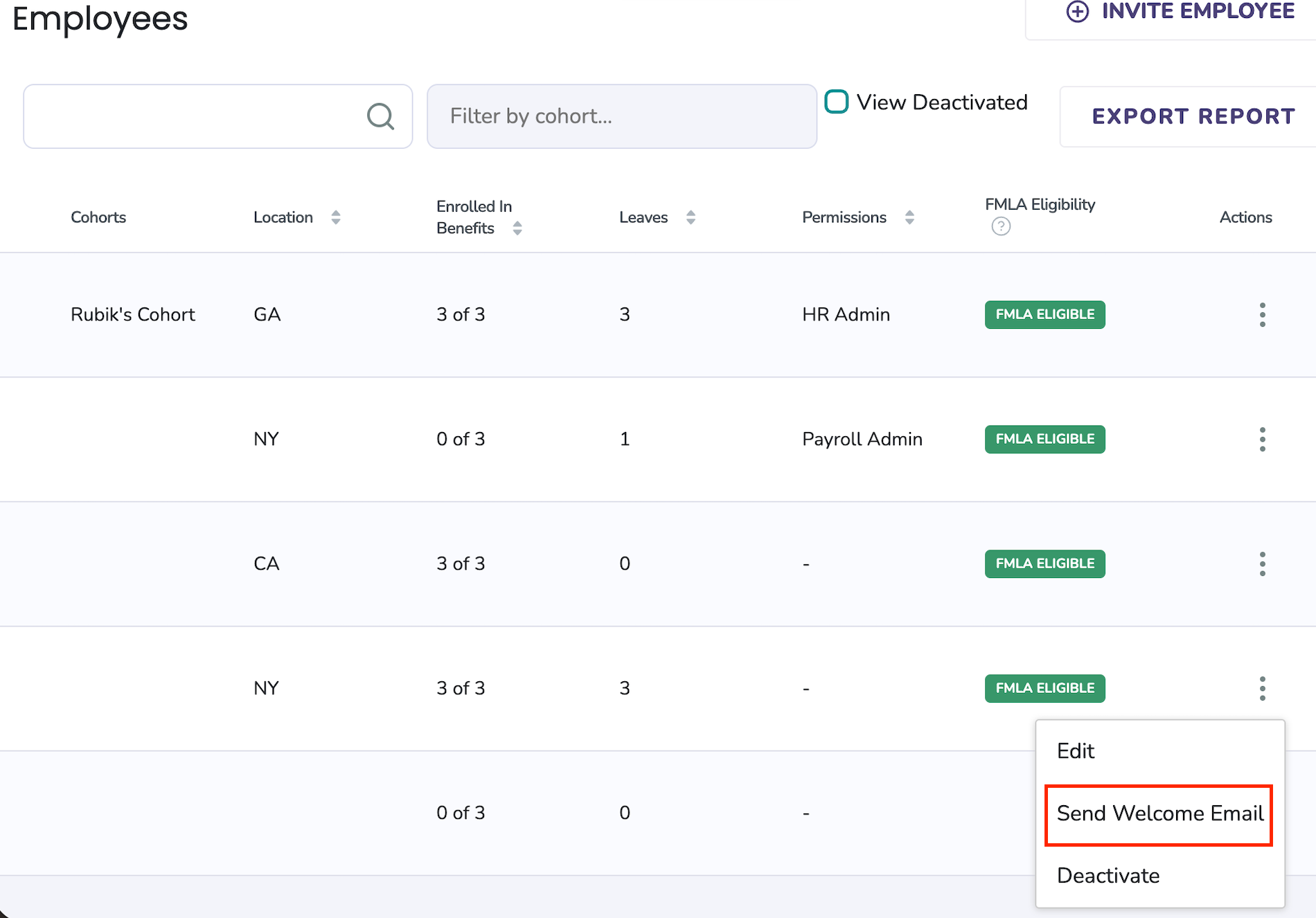
Prerequisites
- You must have HR admin access in Tilt.
- The employee must already be added to Tilt. If they haven't been added yet, follow the steps in [Invite New Users to Tilt] instead.
- If your admin access is limited to a cohort, you can only resend welcome emails to employees within your cohort.
Resend the welcome email
- Click the Employees tab in the left side menu.
- Use the search bar to locate the employee.
- Click the ellipsis icon (⋯) on the far right of the employee's row to expand the action buttons.
- Click Send Welcome Email.
The employee will receive an email prompting them to create their Tilt account.
Note: The account activation email is sent to the employee's work email address, and also to their personal email address if one has been added to their Tilt account.
What if it doesn't work
- The employee checked spam and still has no email: The email may have gone to a different address than expected. If the employee has a personal email on their Tilt account, welcome emails may route there instead of their work email. Have them check their personal inbox (including spam) as well.
- The email went to an old or outdated personal email address: Tilt keeps the first personal email it receives on an account and does not overwrite it, even when HR's file feed provides a newer one. The employee can update their personal email in their Tilt account, or contact support to have it updated on Tilt's end.
- The employee received the email but can't log in after activating: That's a login issue rather than a delivery issue then see [Troubleshoot Your User Login].
- The Send Welcome Email option isn't available for the employee: The employee's account may already be activated (the welcome email only applies to pending activations), or their account may be deactivated. Deactivated accounts can't receive welcome emails.
Limits and exceptions
- Resending the welcome email does not reset passwords, unlock accounts, or change any account details. It only re-triggers the activation email.
- You can only resend the welcome email to employees with a pending activation status. Once an account is activated, this workflow no longer applies.
- If your admin access is limited to a cohort, you cannot resend welcome emails to employees outside your cohort.
- Tilt does not update an employee's personal email address from HR file imports once one is on file. Only the employee (in their Tilt account) or Tilt support can change it.
- If the welcome email arrives at the employee's personal address, they can still use that activation link and then log in with their work email afterward. The link is not tied to which inbox received it.
- Deactivated employees cannot activate their accounts. If the employee was deactivated (including via an HRIS sync like Rippling), the account must be reactivated first. You must contact support.
Related questions
- Invite New Users
- Troubleshoot Your User Login
- Add HR or Payroll Permissions to a User