
Quick answer
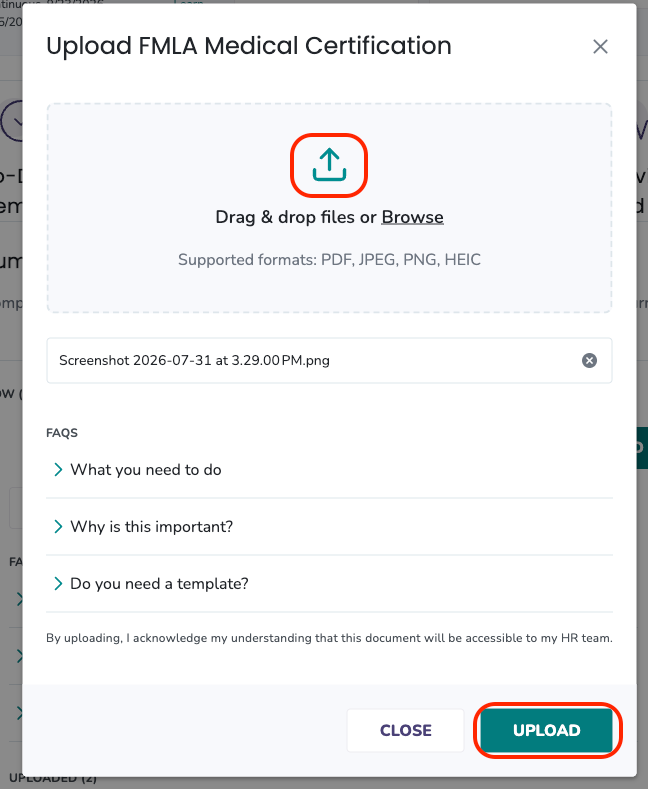
You can upload documents on an employee's behalf from that employee's leave plan Documents section. The upload flow is the same as what the employee uses — click UPLOAD, drop the file, and confirm.
Who this applies to / Prerequisites
- You are an HR user at a Tilt customer.
- The employee has an active leave plan in Tilt.
- You have a document to upload on the employee's behalf.
Steps
- Log into Tilt as an HR user.
- Click Leaves in the left-hand navigation.
- On the Active Leave Plans page, click the row for the employee, then click View Documents in the fly-out to open their full leave plan.

- On the Documents page, find the document requirement you're uploading for.
- Click UPLOAD on the document.

- Drag and drop the file, or click Browse to select from your device. Tilt supports .PDF, .JPEG, .PNG, and .HEIC.
- Click UPLOAD to submit.
- The document status updates just as it would for an employee upload — either to Completed or to Under Review.
- To add more files to a document after it's completed, click Upload Another File on the completed document card.
What if it doesn't work
- If you don't see the document requirement you expect, confirm the Leave Specialist has added it to the employee's leave plan.
- If the upload fails, check the file type and size.
- If a document shows FILL OUT instead of UPLOAD, that document must be filled out and signed by the employee directly in Tilt — you cannot upload a scanned copy on their behalf.
Limits and exceptions.
- Some documents must be filled out and signed by the employee in Tilt — those can't be uploaded by an HR user. Direct the employee to the FILL OUT flow.
- HR users cannot delete uploaded files. If a file needs to be removed, contact your Leave Specialist.
Related questions
- How do I check document status across my company's active leave plans?
- How do I view documents for a specific employee on leave?
- How do I download a document template to share with an employee on leave?