
Quick answer
Each employee's leave has an FMLA tab in Tilt that shows their remaining FMLA balance, total FMLA used, and total FMLA planned. You can also download the FMLA history as a CSV to see usage across multiple leaves.
Who this applies to / Prerequisites
- You are an HR user at a Tilt customer.
- The employee has a published leave plan with an FMLA-qualified leave.
Steps
View an employee's FMLA balance:
- Log into Tilt as an HR user.
- Click Leaves in the left-hand navigation.
- On the Active Leave Plans page, use the search filters to locate the leave.
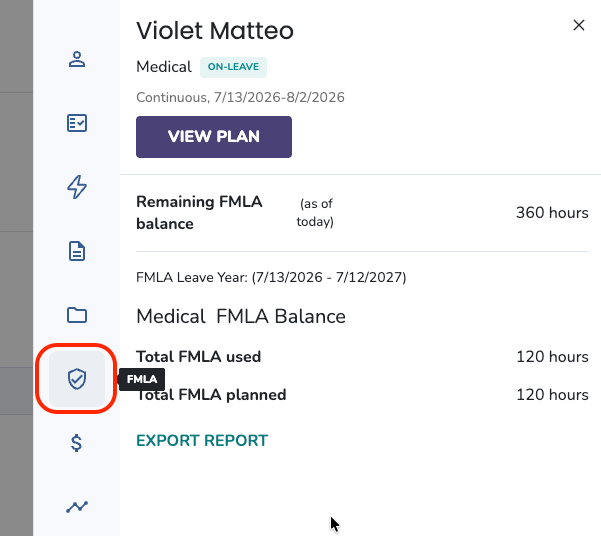
- Click the leave and navigate to the FMLA tab in the right-hand pop-out.
- You'll see the employee's FMLA usage and balance details.
Download the FMLA history report:
- Follow the steps above to navigate to the FMLA tab.
- Click Export Report. The employee's FMLA report downloads as a CSV.
What if it doesn't work
- If you don't see the FMLA tab, confirm the employee's leave is FMLA-qualified. Not every leave is eligible for FMLA.
- If the balance shows unexpected numbers, check the FMLA leave year setup..
- If the export doesn't download, check your browser's pop-up blocker.
Limits and exceptions
- The FMLA tab shows three key details:
|
Detail |
What it means |
|
Remaining FMLA Balance (as of today) |
Amount of FMLA the employee has available to use as of today's date. |
|
Total FMLA Used (as of today) |
Total FMLA the employee has used for the specific leave, in the indicated FMLA leave year. |
|
Total FMLA planned |
Total FMLA the employee will use for this leave, in the indicated FMLA leave year. |
- The FMLA Report is labeled with the employee's first name, last name, ID (if available), and the date range covered. The CSV includes columns for Leave Name, Type of Leave, Date, Amount of FMLA Used, and Remaining FMLA Balance.
- FMLA data reflects the employee's usage across all FMLA-qualified leaves in Tilt, not just the current one.
Related questions
- What is FMLA and How Does It Work
- FMLA Leave Years
- How do I check document status across my company's active leave plans?