
Overview
Your HR Dashboard gives a company-wide view of leaves. The summary tiles at the top show real-time counts for Total Pending, Waiting on HR, Waiting on Employee, Under Review By Tilt, and Missing Effective Dates (Salaries). Each tile tells you how many leaves are in that state so you know what needs action.
Who this applies to / Prerequisites
- You have an HR user role in Tilt.
- You are viewing the Dashboard tab after signing.
Review your leave summary tiles
At the top of your Dashboard, you'll see real-time counts for: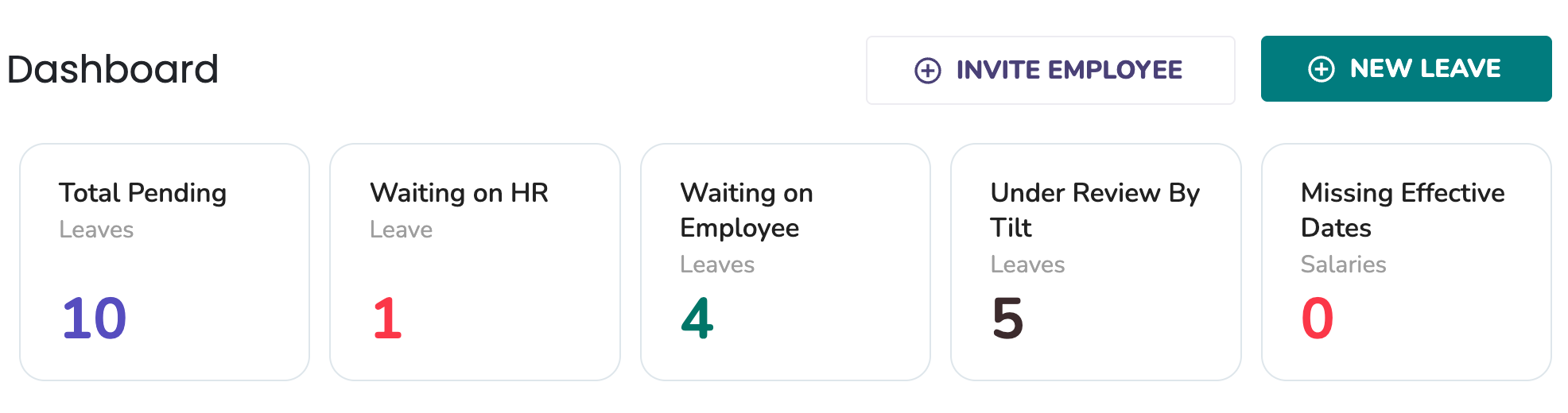
|
Tile |
What it means |
|---|---|
|
Total Pending |
Leaves that have not been built and will need to be reviewed and published to the employee. |
|
Waiting on HR |
An employee has submitted a leave request and completed their portion of the leave survey. An HR user must review the request and take action to approve or deny it. |
|
Waiting on Employee |
An HR user has initiated the leave request on behalf of the employee. The employee must log in and complete their portion of the leave survey. |
|
Under Review By Tilt |
Both HR and the employee have added information about the leave and it has been approved by HR. The Leave Success Manager (LSM) is reviewing all the details and creating the customized leave plan. |
|
Missing Effective Dates (Salaries) |
This is the number of missing salaries where the lack of missing salaries is impacting building the current or any upcoming leaves. Adding effective dates keeps pay calculations accurate. |
What if it doesn't work
- Employees appear under Missing Effective Dates even though their salary dates are entered: This is usually a duplicate salary entry from an older import that has no effective date attached. The correct record exists alongside a dateless duplicate. If you’ve confirmed the correct salary and effective date are on file and the employee still appears, contact your LSM or Tilt Support to have the duplicate removed.
- Your pending counts look higher than expected: Archived leaves are excluded from Dashboard totals but still exist in your account. Go to the Leaves tab and check the View Archived checkbox to reconcile your counts.
- Archived leaves are not included in Dashboard totals. View them from the Leaves tab using the View Archived checkbox.
- If your organization uses cohort-based access controls, your Dashboard reflects only the cohorts you have access to.
- Submit a Leave Request
- Cancel a Leave Request
- Invite New Users to Tilt
- Resend the Welcome Email to New Users
- Update HR or Payroll Permissions for a User