
Tilt pulls only the employee, employment, and location fields needed to decide leave eligibility and calculate pay, refreshes that data from Gusto once a day, and automatically notifies your Leave Specialist if a change affects someone actively on a leave of absence.
Who this applies to / Prerequisites
- HR Admins and employees whose company uses Gusto for payroll or HR records
- Gusto must be connected to Tilt — see [How do I connect Tilt to Gusto?]
Steps
- Once Gusto is connected, Tilt pulls in these fields: employee ID, remote ID, and employee number; first and last name; work or personal email; mobile phone number; start date and most recent employment effective date; employment ID and job title; work location, home location, and country/state/city; termination date or "INACTIVE" status.
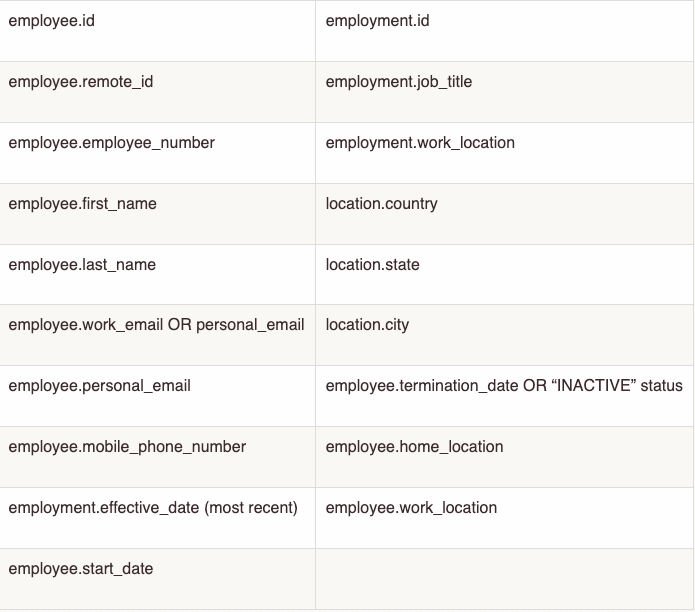
- Tilt checks Gusto for updates once a day and refreshes any changed fields automatically.
- If a change could affect leave eligibility or pay for someone actively on leave, Tilt notifies that employee's Leave Specialist.
What if it doesn't work
- If a field you expect isn't listed above, it isn't part of this integration — contact Tilt Support to confirm.
- If employee data looks out of date for more than a day, or a Leave Specialist notification didn't fire when you expected it to, contact Tilt Support.
Limits and exceptions
- Tilt does not collect Social Security numbers, dates of birth, or full home street addresses — only city and state of residence.
- Data flows one direction only: Gusto into Tilt. Tilt doesn't write data back into Gusto, and changes made in Tilt don't sync to Gusto.
- The integration does not pull pay history — pay schedules, pay stubs, and the 1,250-hours eligibility question always require manual entry in Tilt.
- Only changes affecting someone on active leave trigger a Leave Specialist notification — routine changes for employees not on leave don't.
- Syncs run daily, not in real time.
Related questions
- How do I connect Tilt to Gusto?