
Once Paycor is connected, Tilt automatically imports employee, pay, and time-off data from Paycor and uses it to pre-fill leave requests — so you and your employees have fewer fields to fill in manually.
Who this applies to / Prerequisites
- Applies to HR users and employees at any company with the Paycor integration connected in Tilt.
- No setup is required on your end — this happens automatically once the integration is active.
Steps
- Log in to Tilt and start a new leave request.
- Check the fields Tilt has already filled in using your Paycor data:
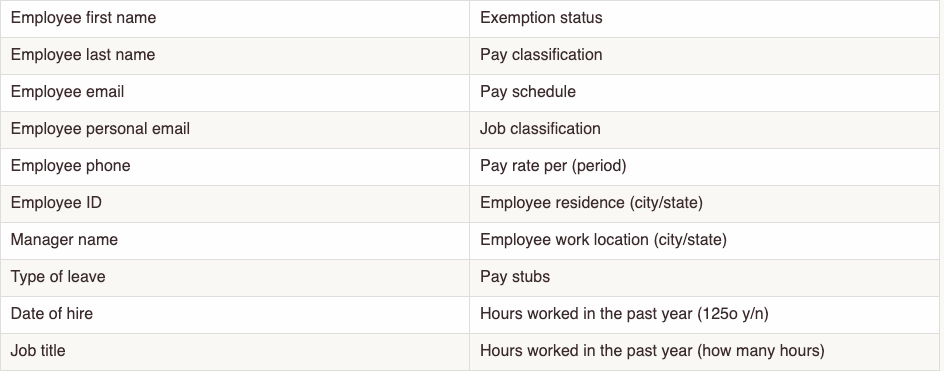
- If you're an HR user, these include: employee first and last name, employee email and personal email, employee phone, employee ID, manager name, type of leave, date of hire, job title, exemption status, pay classification, pay schedule, job classification, pay rate per period, employee residence (city/state), employee work location (city/state), pay stubs, and hours worked in the past year.
- If you're an employee, these include: job title, residence (country/state/city), work location (state/city), and personal email.

- Review the pre-filled information for accuracy.
- If the hours-worked fields are wrong — for example, your company doesn't have 12 months of pay history in Paycor, or you've acquired another company — enter the correct hours yourself. You can override the integration's answer for the hours-worked questions.
- Submit your leave request as usual.
What if it doesn't work
- If a new leave request isn't pre-filled at all, confirm the Paycor integration is connected. (See "How do I connect Paycor to Tilt?")
- Leave-prefill data (name, contact info, pay details) refreshes daily. Eligibility and demographic data refreshes weekly. If you just connected Paycor or just made a change in Paycor, allow time for the next sync before expecting it in Tilt.
- If pre-filled information looks wrong, contact your HR Admin — they can check the source data in Paycor. Employees can also contact their Leave Specialist for help with a specific leave request.
- If none of this resolves it, contact Tilt Support.
Limits and exceptions
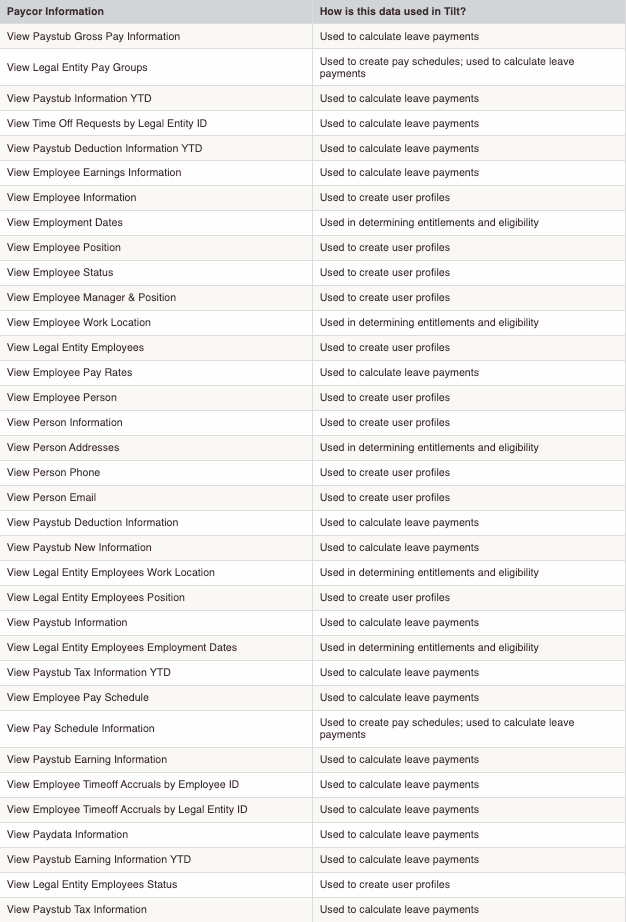
- Tilt only pulls the following categories of data from Paycor:
- Employee profile and contact info (name, email, phone, address, position, manager, employment status, employment dates, work location) — used to build your Tilt user profile and determine leave eligibility.
- Pay and earnings data (pay stubs, gross pay year-to-date, deductions, tax info, pay schedule, pay rate) — used to calculate leave payments.
- Time off data (time off requests, time off accruals) — used to calculate leave payments.
- You can only override the hours-worked fields. The article doesn't state whether other pre-filled fields can be edited directly in Tilt.
- Tilt doesn't pull any data beyond the categories listed above.
Related questions
- How do I connect Paycor to Tilt?