
Quick answer
Your Pay Calculation shows how much you'll be paid during each pay period of your leave, broken out by source (your employer, state benefits, disability provider, etc.). All amounts are gross — before taxes and deductions. Because payments come from multiple sources, they can arrive at different times.
Who this applies to / Prerequisites
- You are an employee at a Tilt customer with a published leave plan.
- You want to understand what your Pay Calculation shows and how to read it.
- HR and Payroll users can also view an employee's Pay Calculation from within the leave plan.
What a Pay Calculation is
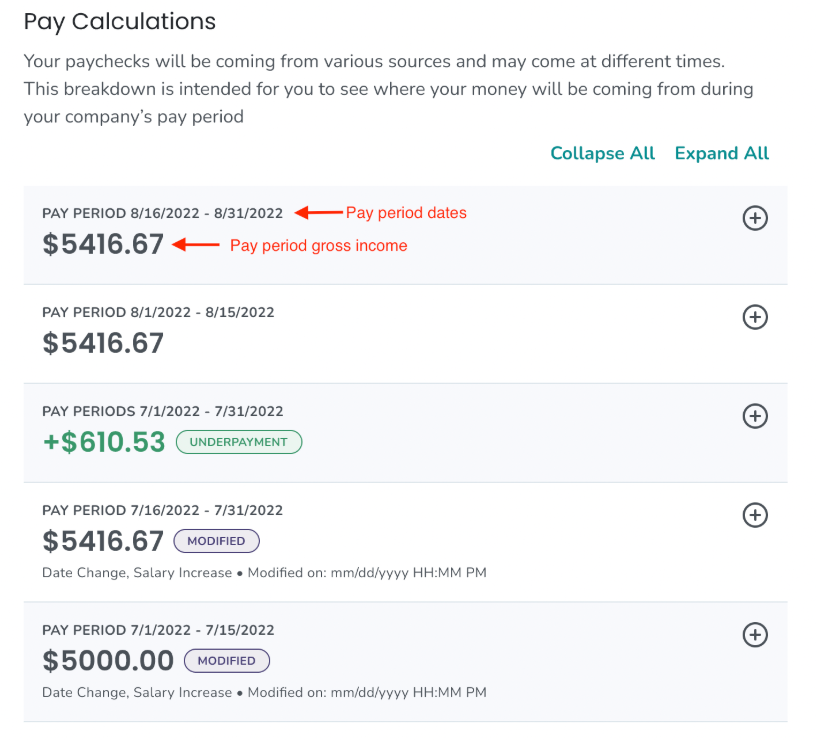
A Pay Calculation is made up of each pay period that occurs during your leave. On the Pay Calculation, each pay period shows the pay you'll receive from all sources — regular wages, company-paid leave benefits, state benefits, and any disability benefits.
- All amounts are gross. Taxes and other deductions aren't reflected. Your actual take-home pay will be lower.
- The last pay period during your leave is listed at the top, and the first pay period is at the bottom.
Important note about payment timing: Payments from different sources come at different times. State benefits and disability benefits, for example, usually don't arrive on the same schedule as your regular paycheck.
How to view your Pay Calculation
When you first open the Pay Calculation, it's in a collapsed view showing only the total for each pay period.
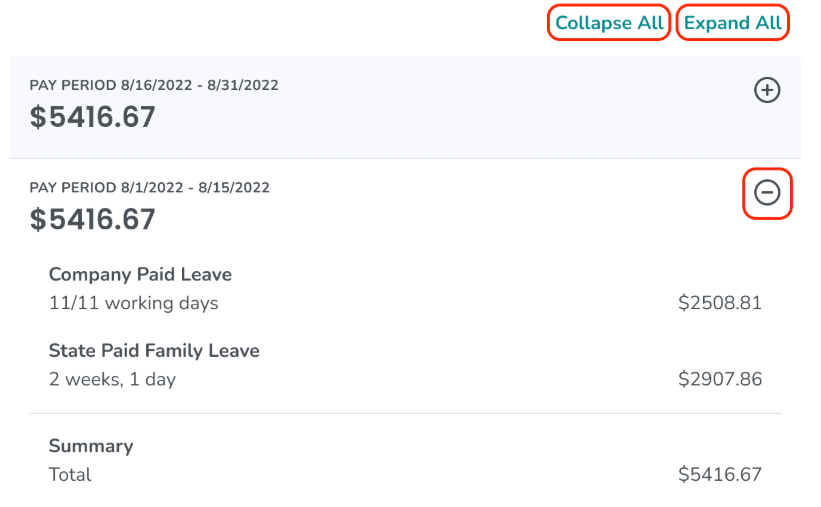
- Click Expand All to open the details for every pay period at once.
- Click Collapse All to close them all again.
- To expand or collapse a single pay period, use the expand/collapse icon on that pay period.
How to read a pay period
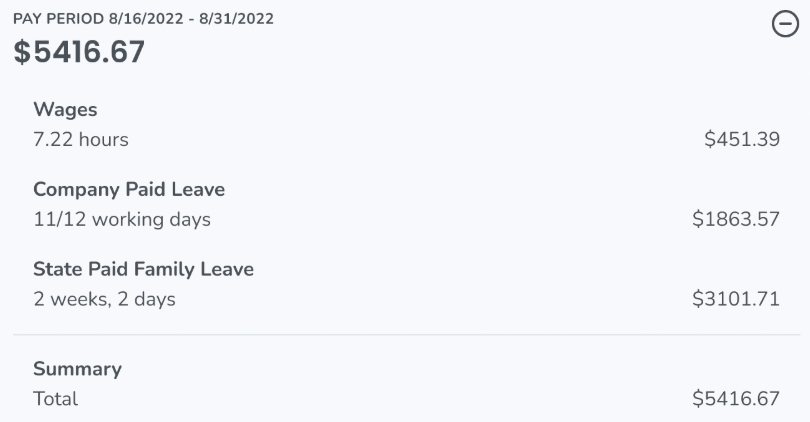
When you expand a single pay period, you'll see three types of information:
- The type of pay you'll receive during the pay period (for example, wages, company-paid parental leave, or a state benefit)
- The dollar amount associated with each pay item
- The time (hours or days) associated with each pay item
If you have questions about a specific pay item or amount, contact your Leave Specialist.
What a Modified Pay Calculation is
If your Pay Calculation needs to be recalculated, a previously paid pay period may need to be updated. When that happens:
- The affected pay period gets a Modified status tag.

- The Modified pay period shows a summary of what changed and when.
- A Pay Calculation with one or more modified pay periods will also show an Adjustment Summary Section.

Reading a Modified pay period: Expand the pay period to see the specific changes — which pay items were adjusted, the dollar amount of each adjustment, and the associated time.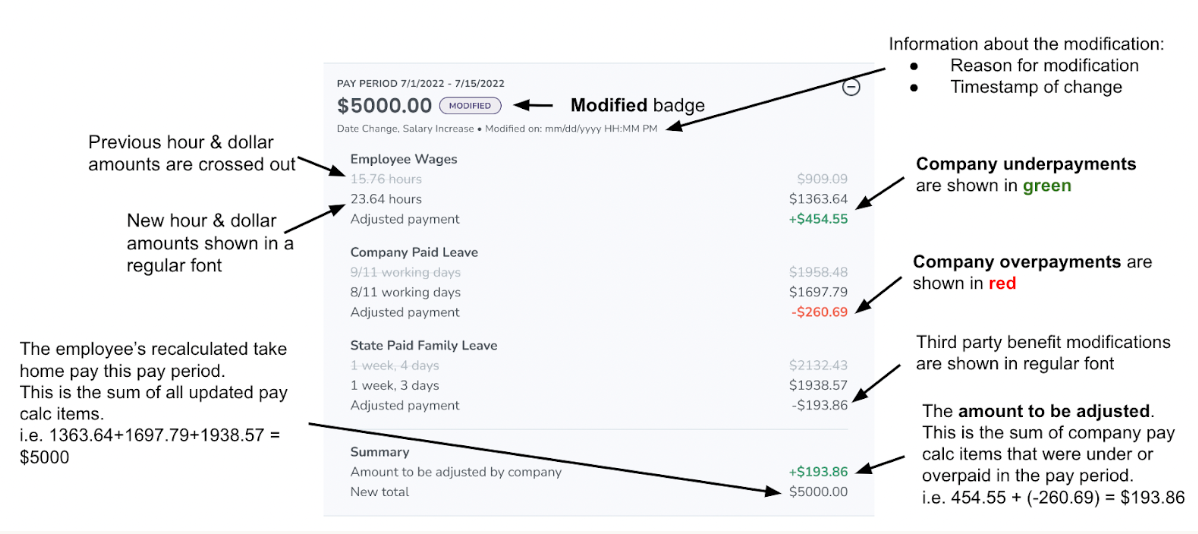
Reading the Adjustment Summary: The Adjustment Summary Section shows all modifications that have happened across multiple pay periods, so you can see the full picture in one place.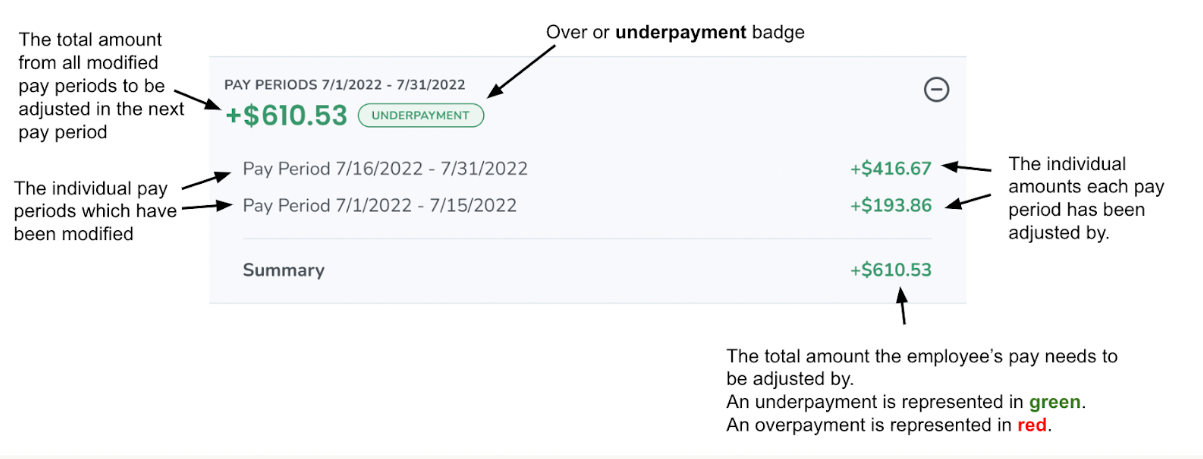
What an Added Pay Period is
Sometimes a Pay Calculation includes a pay period with the status Added Pay Period. 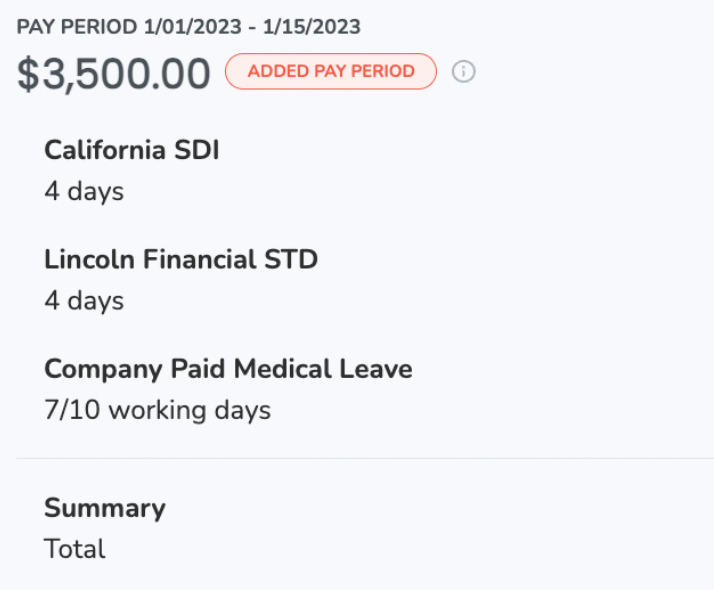
An Added Pay Period happens when leave details or employee information are updated in Tilt in a way that affects a pay period that already closed. For example, if your leave dates are extended and now include a pay period that wasn't part of the original leave, that pay period will be added to your Pay Calculation with the Added Pay Period status.
What if it doesn't work
- If your Pay Calculation looks incomplete, confirm your leave plan is fully published. Pay Calculations are only accurate once the plan is finalized.
- If a pay period is missing that you expected to see, check whether your leave dates have been extended or shortened. A leave date change may not have propagated yet.
- If amounts on the report don't match what you actually received, remember that all amounts on the Pay Calculation are gross — your take-home is after taxes and deductions.
- If a modification appeared and you're not sure why, check the Modified pay period's summary or the Adjustment Summary Section for context.
Limits and exceptions
- All amounts are pre-tax. Actual take-home pay will differ.
- Pay from different sources arrives at different times. Regular paychecks from your employer come on your normal schedule. State benefits, disability benefits, and other third-party payments typically arrive on separate schedules — often on different days than your regular paycheck.
- The Pay Calculation is your Leave Specialist's estimate of what you'll receive. Amounts can shift if your leave changes, if a benefit determination changes, or if your salary changes.
- Pay Calculations are complicated by design — if you have specific questions, contact your Leave Specialist for help.
Related questions
- How do I download a payroll report from Tilt?
- What fields are on the Payroll Report in Tilt?
- How do I read a Payroll Report in Tilt?