
When you start a leave request, Tilt automatically fills in your personal, job, and pay information from Workday, so you'll have less to enter by hand.
Who this applies to / Prerequisites
- Your company has completed the Tilt/Workday integration setup — see "How do I set up the Tilt/Workday integration?"
- You're starting a new leave request in Tilt.
- This applies to employees at companies using the Tilt/Workday integration. If your company doesn't use the integration, you'll fill out the leave form manually.
Steps
- When you start a new leave request, Tilt automatically pulls your information from Workday into the leave form.
- Tilt pre-fills your personal and job details: first name, last name, work email, personal email, phone number, employee ID, manager name, type of leave, date of hire, and job title.
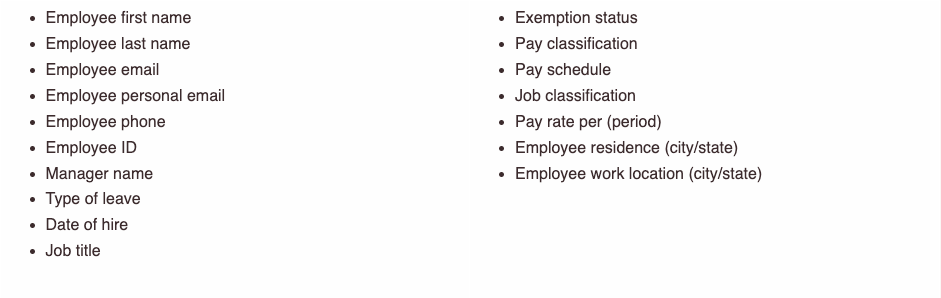
- Tilt pre-fills your pay details: exemption status, pay classification, pay schedule, job classification, pay rate, your home location (city/state), and your work location (city/state).
- After you submit the leave form, Tilt uses your Workday payroll data to try to answer two more items automatically: your pay stubs and whether you've worked at least 1,250 hours in the last 12 months.
What if it doesn't work
- If your company doesn't use Workday for payroll, Tilt can't auto-fill your pay schedule, hours worked, or pay history — you'll need to provide these yourself.
- If Tilt can't pull your pay stubs or answer the hours-worked question (for example, if your company has used Workday for less than a year), your Leave Specialist will follow up with you directly when they review your leave request.
- If any pre-filled information is wrong (like your manager's name or job title), contact your HR team — this data comes from Workday and typically needs to be corrected there.
- If you're not sure why a field wasn't pre-filled, contact Tilt Support or your Leave Specialist.
Limits and exceptions
- Tilt can't pre-fill pay schedules, hours worked, or pay stubs for companies that don't run payroll through Workday.
- Tilt can't answer the 1,250-hours question or supply pay stubs if your company has used Workday for less than one year.
- Data syncs from Workday once a week, so very recent changes (a new hire date, a manager change) may not appear on your leave form right away.
- This auto-fill experience only applies if your company has the Tilt/Workday integration set up.
Related questions
- What Workday data does Tilt use, and how?